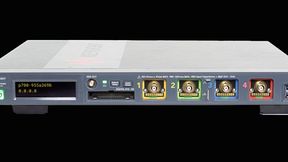
Not every application-specific measurement is built into an oscilloscope. XDEV lets users run custom Python-based analysis and tailor workflows directly on the instrument, potentially reducing the need for external software.
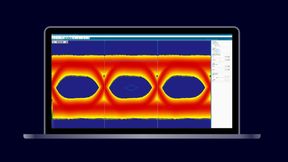
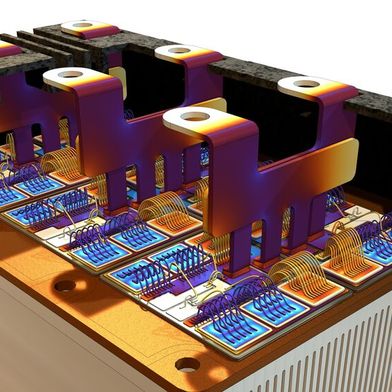
Specific measurement: XDEV lets users run custom Python-based measurements directly on the oscilloscope. The waveform-and-code composition is conceptual, not an actual XDEV screen.
Every oscilloscope comes with built-in measurement functions. If a product requires a measurement that isn't included as standard, the usual approach is to export the waveform data and evaluate it in Python, MATLAB, or other software on an external computer.
With the XDEV option (Advanced Customization), however, the workflow is reversed: the code runs on the instrument rather than the measurement data being sent to the code. XDEV covers two areas: calculation and the user interface. Regarding calculations, users can store their own Python algorithms on the instrument and use them as custom measurement parameters or mathematical functions.
What XDEV Adds to an Oscilloscope
Custom Calculations: Run Python algorithms on the oscilloscope as measurement parameters or mathematical functions. These calculations can be evaluated with each acquisition, displayed alongside measurement statistics, used for limit and pass/fail checks, and accessed remotely.
Custom workflows: Add buttons for recurring setup steps, or build plug-ins with task-specific controls and displays of results. Both run on the oscilloscope without requiring an additional computer.
Calculation Moves Into the Instrument
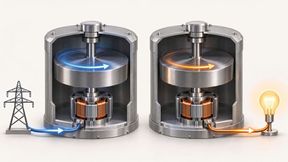
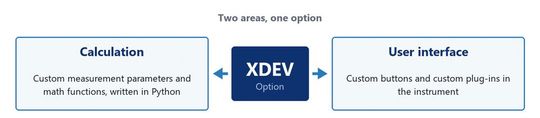
Figure 1. The option has two areas: calculation, meaning custom measurement parameters and math functions in Python, and the user interface, meaning custom buttons and custom plug-ins.
(Source: Teledyne LeCroy)
One example is applying a three-pole Butterworth filter to a signal. In terms of the user interface, users can create custom buttons or develop a plug-in, which is a customized interface integrated into the oscilloscope application and operated like a built-in feature.
The built-in measurement parameters cover most needs. However, some measurements are specific to individual products and do not appear in standard lists. The traditional approach is to export the waveform and post-process it in Python or MATLAB. With XDEV, however, the calculation moves into the instrument. Users write the method once in Python and make it available as a measurement parameter or math function. The instrument then evaluates the method on each acquisition. Like a built-in function, the custom parameter can display statistics, serve as a limit for a pass/fail evaluation, and be read out via remote control.
Validating a Custom Calculation
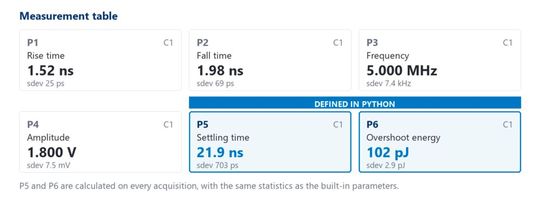
Figure 2. A measurement parameter written in Python occupies a slot in the measurement table and behaves there like a built-in one: display, statistics, limits and remote control are identical.
(Source: Teledyne LeCroy)
A custom measurement should be checked against known reference waveforms before its result is used in a pass/fail evaluation. A filter’s order alone does not define its effect: for a digital Butterworth filter, the cutoff frequency and sampling rate also determine the response. Developers should inspect both magnitude and phase over the frequency range relevant to the application and establish how the algorithm handles the beginning of each record.
A digital filter started with zero initial state can produce a start-up transient, which may affect a short record or a measurement taken near its start. Validation should cover the signal types and record lengths expected in use, not just a single clean waveform. Comparing the custom output with an independent reference calculation can reveal errors. Recording the filter settings and algorithm version also helps make results reproducible when limits are reviewed or changed.
For many development teams, this can be a short step because their evaluation code already exists in Python, MATLAB or Visual Basic Script. Figure 2 shows a measurement table with two custom parameters alongside the built-in ones. The user defined them for the application under development. Like built-in parameters, they are measured at every trigger event. Teledyne LeCroy also points to an intellectual-property aspect: the method stays in-house, while application-specific details and domain expertise remain with their developers.
A Custom Workflow in the Instrument
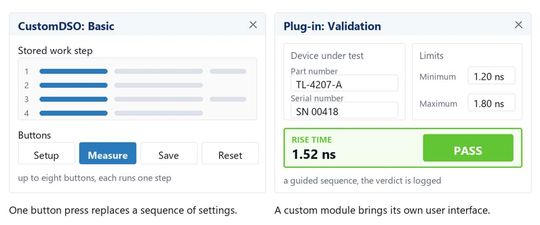
Figure 3. Two levels of customisation: custom buttons, each for one work step, or a custom plug-in with its own controls and its own presentation of results.
(Source: Teledyne LeCroy)
Many measurements require the same preparation. The same settings, measurement parameters, and limits must be entered by hand each time. This process is time-consuming and can affect the accuracy of the results, depending on who performs the preparation. It also requires detailed knowledge of how the instrument works. Not everyone who operates the instrument later on has that knowledge. XDEV offers two levels of customization. At the simpler level, users create custom buttons, each of which runs one work step. A lengthy sequence of settings can then be reduced to a single button press.
Stand: 08.12.2025
Es ist für uns eine Selbstverständlichkeit, dass wir verantwortungsvoll mit Ihren personenbezogenen Daten umgehen. Sofern wir personenbezogene Daten von Ihnen erheben, verarbeiten wir diese unter Beachtung der geltenden Datenschutzvorschriften. Detaillierte Informationen finden Sie in unserer Datenschutzerklärung.
Einwilligung in die Verwendung von Daten zu Werbezwecken
Ich bin damit einverstanden, dass die Vogel Communications Group GmbH & Co. KG, Max-Planckstr. 7-9, 97082 Würzburg einschließlich aller mit ihr im Sinne der §§ 15 ff. AktG verbundenen Unternehmen (im weiteren: Vogel Communications Group) meine E-Mail-Adresse für die Zusendung von redaktionellen Newslettern nutzt. Auflistungen der jeweils zugehörigen Unternehmen können hier abgerufen werden.
Der Newsletterinhalt erstreckt sich dabei auf Produkte und Dienstleistungen aller zuvor genannten Unternehmen, darunter beispielsweise Fachzeitschriften und Fachbücher, Veranstaltungen und Messen sowie veranstaltungsbezogene Produkte und Dienstleistungen, Print- und Digital-Mediaangebote und Services wie weitere (redaktionelle) Newsletter, Gewinnspiele, Lead-Kampagnen, Marktforschung im Online- und Offline-Bereich, fachspezifische Webportale und E-Learning-Angebote. Wenn auch meine persönliche Telefonnummer erhoben wurde, darf diese für die Unterbreitung von Angeboten der vorgenannten Produkte und Dienstleistungen der vorgenannten Unternehmen und Marktforschung genutzt werden.
Meine Einwilligung umfasst zudem die Verarbeitung meiner E-Mail-Adresse und Telefonnummer für den Datenabgleich zu Marketingzwecken mit ausgewählten Werbepartnern wie z.B. LinkedIN, Google und Meta. Hierfür darf die Vogel Communications Group die genannten Daten gehasht an Werbepartner übermitteln, die diese Daten dann nutzen, um feststellen zu können, ob ich ebenfalls Mitglied auf den besagten Werbepartnerportalen bin. Die Vogel Communications Group nutzt diese Funktion zu Zwecken des Retargeting (Upselling, Crossselling und Kundenbindung), der Generierung von sog. Lookalike Audiences zur Neukundengewinnung und als Ausschlussgrundlage für laufende Werbekampagnen. Weitere Informationen kann ich dem Abschnitt „Datenabgleich zu Marketingzwecken“ in der Datenschutzerklärung entnehmen.
Falls ich im Internet auf Portalen der Vogel Communications Group einschließlich deren mit ihr im Sinne der §§ 15 ff. AktG verbundenen Unternehmen geschützte Inhalte abrufe, muss ich mich mit weiteren Daten für den Zugang zu diesen Inhalten registrieren. Im Gegenzug für diesen gebührenlosen Zugang zu redaktionellen Inhalten dürfen meine Daten im Sinne dieser Einwilligung für die hier genannten Zwecke verwendet werden. Dies gilt nicht für den Datenabgleich zu Marketingzwecken.
Recht auf Widerruf
Mir ist bewusst, dass ich diese Einwilligung jederzeit für die Zukunft widerrufen kann. Durch meinen Widerruf wird die Rechtmäßigkeit der aufgrund meiner Einwilligung bis zum Widerruf erfolgten Verarbeitung nicht berührt. Um meinen Widerruf zu erklären, kann ich als eine Möglichkeit das unter https://contact.vogel.de abrufbare Kontaktformular nutzen. Sofern ich einzelne von mir abonnierte Newsletter nicht mehr erhalten möchte, kann ich darüber hinaus auch den am Ende eines Newsletters eingebundenen Abmeldelink anklicken. Weitere Informationen zu meinem Widerrufsrecht und dessen Ausübung sowie zu den Folgen meines Widerrufs finde ich in der Datenschutzerklärung, Abschnitt Redaktionelle Newsletter.
If that is not enough, users can develop a plug-in with its own controls and presentation of results. For instance, they can implement validation of a device under test against stored limits as a guided sequence that ends with a logged verdict. Figure 3 compares the two levels of customization. Both run on the oscilloscope without requiring an additional computer. XDEV brings two types of customization to the oscilloscope: application-specific calculations and task-specific workflows. A Python routine can add a custom measurement parameter or mathematical function, and buttons or a plug-in can simplify repetitive setup steps or guide users through task-specific sequences. The distinction lies in whether the gap is in the value to be calculated or in how the measurement is prepared and carried out.
What Developers Need to Verify
Several integration details remain open for developers assessing XDEV. The article does not specify which oscilloscope models, Python versions, or libraries are supported; how custom routines are tested and maintained; or how much processing time is available when a routine runs on each acquisition.
These details are important for determining whether an existing algorithm can meet the required acquisition rate or validation workflow. Additionally, the article does not explain how errors in a custom routine affect the measurement process. Developers would need to verify these points for their specific instrument and test setup. (heh)
* Ahmad Halawani is Application Engineer at Teledyne LeCroy.